Create Resources
Add the knowledge that gets searched, as Resources inside a Knowledge Group.
A Resource is one piece of knowledge: an article, a procedure, a policy, a list of product codes, anything you want a search to be able to find. A resource holds a single block of text, which the service splits into smaller pieces (chunks) and prepares for search the moment you save it. A search never looks at a whole resource at once, it returns the individual chunks that matched best.
The resource editor
Open a group from Knowledge groups, then Add new resource (or Update an existing one) to open the editor.
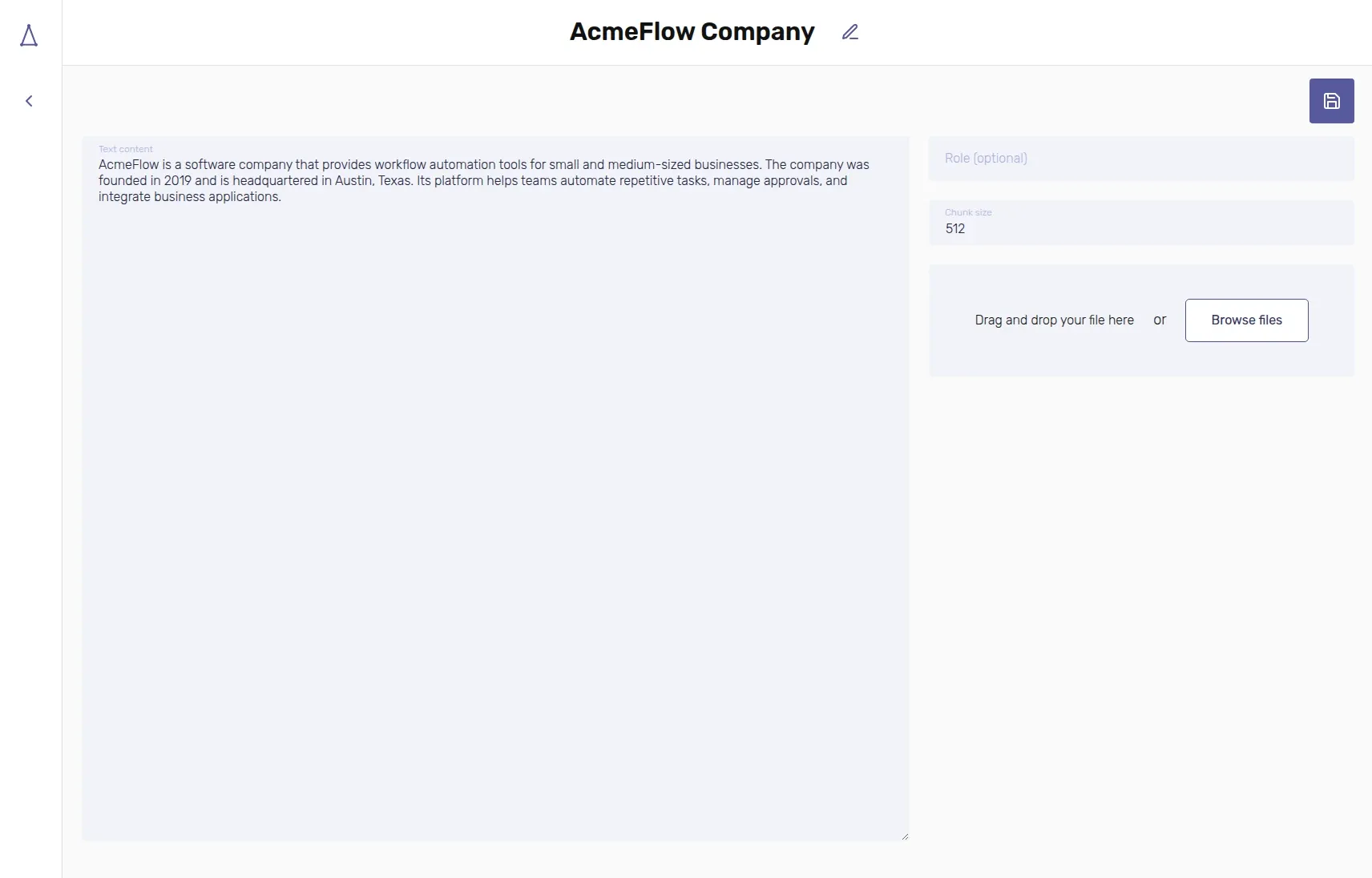
| Field | Required | Description |
|---|---|---|
| Name | Yes | Shown in the resources table, has no effect on search. |
| Text content | Yes | The knowledge itself, typed or pasted directly into the editor. |
| Role (optional) | No | Tags the resource for role-based filtering, see Role Filter. |
| Chunk size | No | How large each chunk is, in characters. Defaults to 512. |
Instead of typing, you can drag a file onto the editor or click Browse
files. Only plain-text files are supported for now (.txt, .md, .json,
.yaml, .yml, .csv, .log). Binary formats like PDF or Word are not
processed. Picking a file replaces whatever is currently in the Text
content field with the file's contents, so review it before saving; you can
still edit the text afterwards, upload and typing are not mutually exclusive.
Both Name and Text content must be filled in before you can save.
Understanding chunks
A chunk is the actual unit that gets searched and returned: when a query comes in, the service compares it against every chunk in the group and answers with the best matching ones, each with its own relevance score. The Chunk size field controls, in characters, roughly how much text goes into each chunk. The splitter tries to break on natural boundaries like paragraphs or sentences rather than mid-word, and consecutive chunks overlap slightly so information right at a cut is not lost.
There is no single right chunk size, it depends on the shape of your content:
- Smaller chunks (a couple hundred characters) work well for content that is really a list of independent, self-contained facts: FAQ entries, product specifications, a table of part numbers. Each fact can be matched and returned on its own, without dragging in unrelated neighbouring text.
- Larger chunks, up to the size of the whole resource, work better when a passage only makes sense as a whole: a step-by-step procedure, a contract clause, a paragraph whose sentences depend on each other. Splitting it would return a fragment that reads as incomplete or misleading on its own.
If you are unsure, the default of 512 characters is a reasonable middle
ground for most prose. You can always resize a resource by editing its Chunk
size, it is not something you commit to at creation time.
Editing a resource's text or Chunk size rebuilds its chunks from scratch. There is no separate reindexing step, and a search can never return text you have already corrected or deleted.
Role Filter
The Role field is optional and free text: use it to tag a resource with
whatever category makes sense for you, most commonly a user role like
support, manager or customer. A search can pass a role of its own, see
External integrations, and only sees
resources tagged with that same role.
Leaving Role empty on a resource makes it available to every search, regardless of the role that search filters by. Think of it as content everybody is allowed to see, alongside role-specific content that only some searches should surface.
When you connect through Tuix AI Agents, the Role Filter is set automatically from the signed-in user's real JWT role, so the same Knowledge Group can answer differently for different users without any extra configuration on your side.
Once a group has a few resources in it, try a real search against them from the dashboard before writing any integration code, see Search and ranking.